AI photo editing is becoming very popular on social media. Many creators now use AI prompts to generate stylish photos with luxury cars. These photos look like professional photoshoots even though they are created using simple text prompts.
With boys car AI photo editing prompts, you can create images with sports cars, luxury backgrounds, and cinematic lighting. These images are commonly used for Instagram posts, profile pictures, and reels. The best part is that you do not need expensive equipment or real luxury cars. AI tools can generate realistic photos in just a few seconds.
Features Of Boys Luxury Car Ai Photo Editing Prompts
Luxury color photo editing is a modern editing style where AI helps turn a simple photo into a stylish luxury image. With the help of AI tools, even a normal selfie can be transformed into a premium lifestyle photo with rich colors, dramatic lighting, and attractive backgrounds. You can easily add your favorite color tones or effects to match the look you want. Also Check: Preset Editors.
Many creators prefer backgrounds like city lights, neon streets, or luxury urban scenes to give their photos a cinematic feel. By making small changes in the AI prompt, you can completely change the style of the image and turn an ordinary photo into a professional luxury look photo.
Top AI Tools for Luxury Photo Editing
Today, many AI tools make photo editing simple and fast. These tools can generate realistic images, improve lighting, and add luxury backgrounds with just a text prompt. Most creators use them to create stylish boy photos with luxury cars, cinematic lighting, and social media ready images.
How To Create Image With Prompts?
Creating a luxury car AI photo is very easy. Even beginners can create professional looking images in minutes. First, open an AI image generator such as Bing Image Creator or Leonardo AI. These tools allow you to create images using text prompts. Next, write a clear and detailed prompt. Mention the car model, clothing style, pose, lighting, and background.
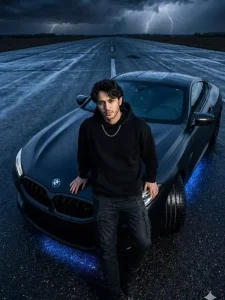
4K night scene of a black BMW supercar on a wet road under a stormy sky. A muscular man in black streetwear leans on the hood, calm and powerful. BMW has satin black finish, carbon fiber vents, dark wheels, and subtle blue underglow reflecting on wet asphalt. Shot from high drone angle with dramatic rim lighting, fog, rain droplets, and ultra-HD cinematic luxury look.

A stylish man, same as the uploaded image, sits on a white Porsche 911 GT3 RS in an industrial hangar, wearing green velvet polo, baggy blue jeans, black boots, and a diamond necklace. Shot waist-level, full-body, centered, soft industrial lighting, hyper-realistic, cinematic automotive style.

A young man with messy voluminous hair and sharp fade, wearing a maroon zip hoodie over a white tee, grey baggy jeans, and white shoes, stands casually with one hand in pocket and a coffee near a glossy black BMW M4 at a Chevron gas station at night, shot with direct flash for a gritty, retro urban vibe.

Create image. Stylish 25 year young man(use refrence image) standing with black BUGATTI car, number plate is “RB 1”, wearing a white HR brand t- shirt with black cargo pants, and high- top red-white sneakers. Confident relaxed pose, watch on wrist,, cityscape background with full view of Museum of The Future Dubai night view with multiple buildings softly. use the same face as i uploaded.
How to Generate and Style AI Photos?
Step 1: Open ChatGPT or any AI image generator.
Step 2: Select the “Create Image” option.
Step 3: Upload a selfie or base photo.
Step 4: Paste a detailed prompt from the article.
Step 5: Generate the image and review the result.
Step 6: Refine the prompt if the image isn’t perfect and try again.
Step 7: Adjust clothing, backgrounds, and details for the desired style.
Step 8: Add luxury elements like suits, cars, mansions, or cityscapes.
Step 9: Apply cinematic lighting for a realistic effect.
Step 10: Export the final image in high resolution (4K) for the best quality.
Tips to Create Stunning AI Photos
Conclusion
Boys luxury car AI photo editing prompts make it easy to create stylish and realistic photos. With AI tools, you can generate luxury lifestyle images without expensive equipment or professional photoshoots.
These prompts allow you to experiment with cars, outfits, and cinematic backgrounds. Using the right prompts and AI tools, you can quickly produce eye catching luxury car photos, fashionable portraits, and social media ready content in just a few clicks.
Leave a Reply